Saturday, October 31, 2009

DZ3 Data Logger: Splitters

Some entities (thermostat, PID controller that is a part of it, zone controller to name a few) produce signal that is more complicated than DataSample<Double>, which is just about as complex as DataLogger can accept.

In order to break down complex signals to simple components, splitters exist. Here's how you can configure one (irrelevant beans omitted):

<bean id="thermostat-6EE055000000" class="net.sf.dz3.device.model.impl.ThermostatModel">
<constructor-arg type="java.lang.String" value="1-Wire 6EE055000000"/>
<constructor-arg type="net.sf.dz3.device.sensor.TemperatureSensor" ref="temperature_sensor-6EE055000000"/>
<constructor-arg type="net.sf.dz3.controller.pid.AbstractPidController" ref="pid_controller_6EE055000000"/>
</bean>
<bean id="splitter-thermostat-6EE055000000" class="net.sf.dz3.device.model.impl.ThermostatSignalSplitter">
<constructor-arg index="0" ref="thermostat-6EE055000000"/>
</bean>
<bean id="rrdlogger_thermostats" class="net.sf.jukebox.datastream.logger.impl.rrd.RrdLogger" init-method="start">
<constructor-arg index="0" type="java.util.Set">
<set>
<ref bean="splitter-thermostat-6EE055000000"/>
</set>
</constructor-arg>
<constructor-arg index="1" type="java.io.File" ref="rrdbase_thermostats"/>
<constructor-arg index="2" type="java.io.File" ref="rrdtool"/>
</bean>

The above example will make the rrdlogger_thermostats data logger automatically subscrube to all signals that are produced by thermostat-6EE055000000 and create a channel for each of them (in this particular case, they will be named "1-Wire 6EE055000000" and "1-Wire 6EE055000000.calling").
IMPORTANT: Make sure you don't create the controller you're trying to monitor with scope="prototype" - you will end up with a new instance, not connected to anything and not doing anything till the end of time. Goes without saying that you can not reuse controller instances for different entities - you will have to create diferent instances with diffent bean IDs.
Splitters for other complex entities will be written as need arises - keep your eye on the code base. One good way to do that is to subscibe to commits RSS feed.

Thursday, October 29, 2009

DZ3 Data Logger: Logging *Everything*

During DZ2 development it became clear tat there's no such thing as too much instrumentation data. Hence, DZ3 was architected in such a way that any object that produces DataSample<E extends Number> can have their data logged.

Here's an example how you can log temperature sensor data (this has been added to the bottom of this example):


<!-- Loggers -->
<bean id="rrdbase" class="java.io.File">
<!-- This is the path in the file system. If in doubt, make it absolute --/>
<constructor-arg type="java.lang.String" value="./rrd"/>
</bean>
<bean id="rrdtool" class="java.io.File">
<constructor-arg type="java.lang.String" value="/usr/bin/rrdtool"/>
</bean>
<bean id="rrdlogger" class="net.sf.jukebox.datastream.logger.impl.rrd.RrdLogger" init-method="start">
<constructor-arg index="0" type="java.util.Set">
<set>
<ref bean="temperature_sensor-6EE055000000"/>
<ref bean="temperature_sensor-cpu1"/>
<ref bean="temperature_sensor-cpu2"/>
<ref bean="temperature_sensor-mobo"/>
<ref bean="temperature_sensor-sda"/>
<ref bean="temperature_sensor-sdb"/>
</set>
</constructor-arg>
<constructor-arg index="1" type="java.io.File" ref="rrdbase"/>
<constructor-arg index="2" type="java.io.File" ref="rrdtool"/>
</bean>

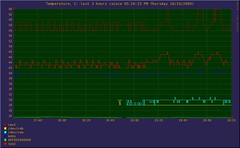
And here's the data that it produced during its first 3 hours of operation:

3 Hours of DZ3

UPDATE (2009/11/08): Added comment to rrdbean constructor argument - thanks to David for clarification.

DZ3 Configuration: Teaser

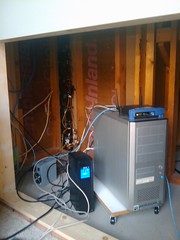
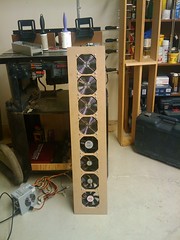
DZ3 is about to start working as a forced ventilation controller for a computer located in a closed, but ventilated compartment under a staircase. Picture on the left is of the computer itself (fan assembly is visible in the background). Picture on the right is of the fan assembly that provides ventilation (by the way, not loud at all).

Cable Management: You Need SomeFan Assembly

And below is the configuration that reads three lm_sensors supported sensors and one 1-Wire sensor (mapped to the file system by owfs-fs) and feeds the data to the rest of the system. If you want to see it, copy & paste somewhere else - there's no way to make it readable here.


<?xml version="1.0" encoding="UTF-8"?>
<beans xmlns="http://www.springframework.org/schema/beans"
xmlns:xsi="http://www.w3.org/2001/XMLSchema-instance"
xsi:schemaLocation="http://www.springframework.org/schema/beans
http://www.springframework.org/schema/beans/spring-beans-2.5.xsd">

<!-- Sensors -->
<bean id="temperature_sensor-6EE055000000" class="net.sf.dz3.device.sensor.impl.ShellSensor" init-method="start">
<constructor-arg index="0" value="6EE055000000"/>
<constructor-arg index="1" value="1000"/>
<constructor-arg index="2" value="/bin/cat /mnt/onewire/28.6EE055000000/temperature12|tr -s ' '"/>
</bean>
<bean id="temperature_sensor-cpu1" class="net.sf.dz3.device.sensor.impl.ShellSensor" init-method="start">
<constructor-arg index="0" value="cpu1"/>
<constructor-arg index="1" value="1000"/>
<constructor-arg index="2" value="/usr/bin/sensors|grep Int|tr -s ' '|cut -f 3 -d ' '|tr -d '+°C'"/>
</bean>
<bean id="temperature_sensor-cpu2" class="net.sf.dz3.device.sensor.impl.ShellSensor" init-method="start">
<constructor-arg index="0" value="cpu2"/>
<constructor-arg index="1" value="1000"/>
<constructor-arg index="2" value="/usr/bin/sensors|grep AMD|tr -s ' '|cut -f 3 -d ' '|tr -d '+°C'"/>
</bean>
<bean id="temperature_sensor-mobo" class="net.sf.dz3.device.sensor.impl.ShellSensor" init-method="start">
<constructor-arg index="0" value="mobo"/>
<constructor-arg index="1" value="1000"/>
<constructor-arg index="2" value="/usr/bin/sensors|grep M/B|tr -s ' '|cut -f 3 -d ' '|tr -d '+°C'"/>
</bean>

<!-- Thermostats -->
<bean id="pid_controller_6EE055000000" class="net.sf.dz3.controller.pid.SimplePidController" scope="prototype">
<constructor-arg index="0" value="22.5"/>
<constructor-arg index="1" value="1"/>
<constructor-arg index="2" value="0"/>
<constructor-arg index="3" value="0"/>
<constructor-arg index="4" value="0"/>
</bean>
<bean id="thermostat-6EE055000000" class="net.sf.dz3.device.model.impl.ThermostatModel">
<constructor-arg type="java.lang.String" value="1-Wire 6EE055000000"/>
<constructor-arg type="net.sf.dz3.device.sensor.TemperatureSensor" ref="temperature_sensor-6EE055000000"/>
<constructor-arg type="net.sf.dz3.controller.pid.AbstractPidController" ref="pid_controller_6EE055000000"/>
</bean>

<bean id="pid_controller_cpu1" class="net.sf.dz3.controller.pid.SimplePidController" scope="prototype">
<constructor-arg index="0" value="56"/>
<constructor-arg index="1" value="1"/>
<constructor-arg index="2" value="0"/>
<constructor-arg index="3" value="0"/>
<constructor-arg index="4" value="0"/>
</bean>
<bean id="thermostat-cpu1" class="net.sf.dz3.device.model.impl.ThermostatModel">
<constructor-arg type="java.lang.String" value="CPU1"/>
<constructor-arg type="net.sf.dz3.device.sensor.TemperatureSensor" ref="temperature_sensor-cpu1"/>
<constructor-arg type="net.sf.dz3.controller.pid.AbstractPidController" ref="pid_controller_cpu1"/>
</bean>

<bean id="pid_controller_cpu2" class="net.sf.dz3.controller.pid.SimplePidController" scope="prototype">
<constructor-arg index="0" value="44"/>
<constructor-arg index="1" value="1"/>
<constructor-arg index="2" value="0"/>
<constructor-arg index="3" value="0"/>
<constructor-arg index="4" value="0"/>
</bean>
<bean id="thermostat-cpu2" class="net.sf.dz3.device.model.impl.ThermostatModel">
<constructor-arg type="java.lang.String" value="CPU2"/>
<constructor-arg type="net.sf.dz3.device.sensor.TemperatureSensor" ref="temperature_sensor-cpu2"/>
<constructor-arg type="net.sf.dz3.controller.pid.AbstractPidController" ref="pid_controller_cpu2"/>
</bean>

<bean id="pid_controller_mobo" class="net.sf.dz3.controller.pid.SimplePidController" scope="prototype">
<constructor-arg index="0" value="38"/>
<constructor-arg index="1" value="1"/>
<constructor-arg index="2" value="0"/>
<constructor-arg index="3" value="0"/>
<constructor-arg index="4" value="0"/>
</bean>
<bean id="thermostat-mobo" class="net.sf.dz3.device.model.impl.ThermostatModel">
<constructor-arg type="java.lang.String" value="Motherboard"/>
<constructor-arg type="net.sf.dz3.device.sensor.TemperatureSensor" ref="temperature_sensor-mobo"/>
<constructor-arg type="net.sf.dz3.controller.pid.AbstractPidController" ref="pid_controller_mobo"/>
</bean>

<!-- Dampers: None for now -->

<!-- Zone Controllers -->
<bean id="zone_controller-mx" class="net.sf.dz3.device.model.impl.SimpleZoneController">
<constructor-arg type="java.util.Set">
<set>
<ref bean="thermostat-6EE055000000"/>
<ref bean="thermostat-cpu1"/>
<ref bean="thermostat-cpu2"/>
<ref bean="thermostat-mobo"/>
</set>
</constructor-arg>
</bean>

<!-- HVAC Units -->
<bean id="unit-mx" class="net.sf.dz3.device.model.impl.UnitModel">
<constructor-arg type="java.lang.String" value="mx"/>
<constructor-arg type="net.sf.dz3.device.model.ZoneController" ref="zone_controller-mx"/>
</bean>

<!-- Damper Controllers: None for now -->

</beans>

Wednesday, October 28, 2009

DZ3 Configuration, Part 1

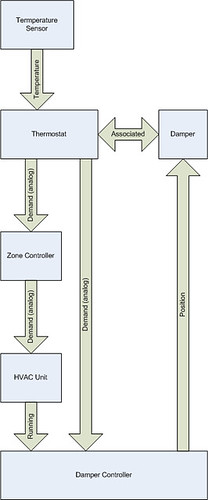
This is a simplified representation of how things are connected in DZ3:

DZ3 Data Flow, simplified

Every entity can act as a signal producer, and as a signal consumer. Exceptions are temperature sensors that can only be producers, and dampers that can only be consumers (unless there's instrumentation feedback).

Temperature Sensor

  • Consumes nothing
  • Produces Temperature
Thermostat
  • Consumes Temperature
  • Produces Zone Demand
  • Has 1:1 relation with the Damper
Zone Controller
  • Consumes Zone Demand
  • Produces Total Demand
HVAC Unit
  • Consumes Total Demand
  • Produces Running
Damper Controller
  • Consumes Zone Demand, Running
  • Produces Damper Position
  • Has to be aware about Thermostat:Damper relations
Damper
  • Consumes Damper Position
  • Produces nothing
  • Has a 1:1 relation with the Thermostat
Data Logger
  • Consumes everything
HOW TO PUT IT ALL TOGETHER

At this moment, the DZ3 container is based upon Spring Framework. If you are familiar with Spring, then a quick look at the sample configuration will tell you everything you need to know (provided you're somewhat familiar with the the code base).

If not, stay tuned.

UPDATE: Configuration Guide is now available.

DZ3 Runner

Release early, release often

-- ESR

There is no established place for shell components of DZ3 yet, so, for lack of a better place, here's a script that will run a valid DZ3 code base that you've just built on any Unix system (watch long lines):

#! /bin/sh

LIBDIR=${HOME}/.m2/repository

COMMONS_LOGGING=${LIBDIR}/commons-logging/commons-logging/1.1.1/commons-logging-1.1.1.jar
LOG4J=${LIBDIR}/log4j/log4j/1.2.15/log4j-1.2.15.jar
SPRING=${LIBDIR}/org/springframework/spring/2.5.6/spring-2.5.6.jar

DZ=${LIBDIR}/net/sf/dz3
DZ_VERSION=3.0

JUKEBOX=${LIBDIR}/net/sf/jukebox
JUKEBOX_VERSION=6.0-RC2

# Reverse order, so inheriting classes have a priority (good for configuration)

export CLASSPATH="./${your_configuration_directory}:\
${DZ}/dz3-model/${DZ_VERSION}/dz3-model-${DZ_VERSION}.jar:\
${DZ}/dz3-common/${DZ_VERSION}/dz3-common-${DZ_VERSION}.jar:\
${DZ}/dz3-sensors/${DZ_VERSION}/dz3-sensors-${DZ_VERSION}.jar:\
${DZ}/dz3-spring/${DZ_VERSION}/dz3-spring-${DZ_VERSION}.jar:\
${JUKEBOX}/jukebox-common/${JUKEBOX_VERSION}/jukebox-common-${JUKEBOX_VERSION}.jar:\
${JUKEBOX}/jukebox-datastream/${JUKEBOX_VERSION}/jukebox-datastream-${JUKEBOX_VERSION}.jar:\
${JUKEBOX}/jukebox-jmx/${JUKEBOX_VERSION}/jukebox-jmx-${JUKEBOX_VERSION}.jar:\
${JUKEBOX}/jukebox-sem/${JUKEBOX_VERSION}/jukebox-sem-${JUKEBOX_VERSION}.jar:\
${JUKEBOX}/jukebox-service/${JUKEBOX_VERSION}/jukebox-service-${JUKEBOX_VERSION}.jar:\
${COMMONS_LOGGING}:\
${LOG4J}:\
${SPRING}"

#echo $CLASSPATH

# Remember that arguments on the command line are relative to the root of CLASSPATH
# -Dcom.sun.management.jmxremote is needed to allow accessing DZ with JMX management tools
$JAVA_HOME/bin/java \
-Dcom.sun.management.jmxremote \
-cp $CLASSPATH \
net.sf.dz3.runtime.Container $*

COMING UP

Runtime configuration