It looks like DIY Zoning & Home Climate Control Forum is the best place for status updates, and Home Climate Control page on GitHub is the best place for reference information.
Hence, there will be no new posts on this blog, and only items of historical interest will be retained. All the guides and HOWTOs will be migrated to DZ Wiki on GitHub one by one.
See you there.
Tuesday, April 21, 2020
Moving On

Monday, March 16, 2015
Reminder: remove calendar stored credentials when switching HVAC modes
If you've just switched from heating to cooling (or the other way around for those down under), the first run of the system will use the calendar credentials stored by Google calendar client library in ${HOME}/.dz/calendar/StoredCredential, and your system will try to use the wrong schedule (that is, if you followed our advice and are using two different calendars for heating and cooling).
Just move that file away, or remove it altogether - DZ will present the credentials screen next time the calendar needs to be consulted.
Monday, November 17, 2014
Early Access: Google Calendar API v3 Integration
Google shut down Calendar API v2 and v1 today, replaced by v3. v3 is not a drop-in replacement for earlier versions, changes are required.
BEFORE
You specify credentials either as a part of configuration (permanently), or via JMX (after server startup).NOW
First time, DZ starts an external browser with OAuth callback URL, you choose credentials to use, grant the permission to use them, DZ stores the token (not credentials) until it expires. Afterwards, calendar updater reads the token and proceeds without requiring a browser.CODE CHANGES
Get the current version from Github. Release will be following shortly.
CONFIGURATION CHANGES
You need to remove credentials from the configuration.BEHAVIOR CHANGES
The only change you should notice is how to make DZ understand that you want to change the account associated with the calendar. Remove ${HOME}/.dz/calendar/StoredCredential file to make DZ request authentication again.
Saturday, August 16, 2014
Upcoming release: DZ 3.6.6
This is a cumulative release combining over two years of bugfixes.
Summary:
- Google Calendar access code brought to compliance with current API behavior (more secure);
- Improved XBee devices stability, analog sensors are no longer susceptible to noise;
- "Return to schedule" functionality is now accessible from mobile devices.
Surprisingly, there's nothing else, other than known problems (which are apparently too rare or too minor to matter).
If there is something that is bothering *you* - now is time to speak up so it gets addressed and included into this release.
Friday, November 2, 2012
Competition: Next Nest: Short Take
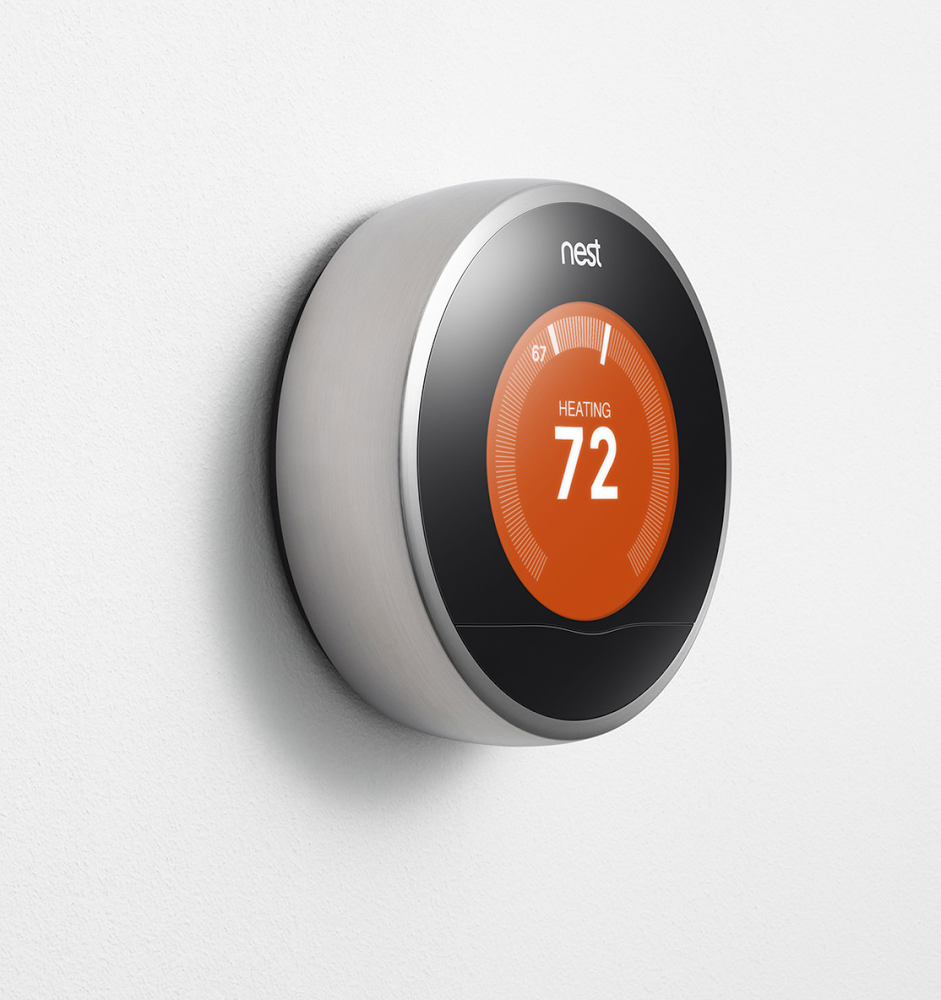
Lo and behold, the new Nest is here.
20% thinner.
Can't resist from thinking - when does it become so thin that oversized fingers of the contemporary user base will start smudging the walls?
On the positive note: latest version of Nest Mobile on Android doesn't require the right to discover accounts on the device. And indeed, the base layout is significantly better.
UPDATE: Who would've thunk it, they now sell wall plates to prevent the walls from being smudged.
Saturday, September 1, 2012
Competition: Nest: Airwave: Fail
Spent the summer with Nest installed in my workshop for benchmarking. Whereas I'm not quite impressed with general performance, there's one thing I'm sorely disappointed with: Airwave.
Let's start with the fact that it is advertised as "an exclusive feature of Nest Learning Thermostat". Well, it's not. It existed for ages - don't know about thermostats, but one of my 10+ old HVAC units has it implemented in hardware.
Then come claims that it can "reduce A/C runtime up to 30%". I really doubt it. Except, maybe, the "up to" part - you see, technically, 1% falls under "up to 30%" as well.
Now, "I doubt it" is not a scientific proof, but here's the facts that make me come forward with this claim, and some more.
- Under some circumstances, Airwave will backfire. Trivial example: volumetric heat capacity of the inner coil is too small for the amount of time Nest lets the air handler run. I do not know how they calculate this amount, but in either case, it fails for my specific configuration, 'cause it starts blowing warm air shortly after condenser is shut off.
- To add insult to an injury, this makes the A/C to turn on sooner than it would otherwise have, causing short cycling.
- Apparently, the decision to activate Airwave doesn't really take latent heat into consideration [to proper extent], and I end up with a clammy workshop which makes me put the temperature down two degrees - my normal comfortable working temperature is 28°C, but at the end of this summer, as monsoon came and brought humidity with it, I had to drop it to 26°C.
- In addition, it appears that the inner coil's temperature rises above the dew point quite fast, and air stream starts blowing the condensate back into the air it just finished working hard on extracting humidity out of.
As a result, let me use Nests' marketspeak, "I may have ended up with electric bill up to 30% higher than last summer", when a dumb thermostat was in exactly the same location.
Now,
- Can you fine-tune Airwave? No.
- Can you disable Airwave?
NoYes.You have to convince it first that you really want it off, Dave. (see update below)
So, either I have to put up with Nest's inefficiency, or I will have to take it off and eat the $250 + shipping as a cost of curiosity, or just sell it to someone fascinated with it. I suspect the latter will be the case, for Nest is surely falling short of its advertised virtues.
Disclaimer: The above is a personal opinion, based on subjective feelings and objective measurements. Your mileage may vary.
UPDATE (2012/10/02): Since about a couple of days ago, it is possible to disable it. However, as of the moment of writing, this is not yet reflected anywhere on Nest support site.
UPDATE (2012/10/03): Automagically, Airwave turned back on without my interference. So if it annoys you as much as it annoys me, you'll have to watch it for a while and make sure that it is really off. A similar issue came up with Auto-Away - it turns back on without being told to. Looks like a telltale sign of not saving a flag state when a device firmware update is happening.
UPDATE (2012/10/02): Since about a couple of days ago, it is possible to disable it. However, as of the moment of writing, this is not yet reflected anywhere on Nest support site.
UPDATE (2012/10/03): Automagically, Airwave turned back on without my interference. So if it annoys you as much as it annoys me, you'll have to watch it for a while and make sure that it is really off. A similar issue came up with Auto-Away - it turns back on without being told to. Looks like a telltale sign of not saving a flag state when a device firmware update is happening.
Wednesday, June 27, 2012
DZ + Android: Early Access: Overseer
HCC Overseer is available for test drive upon request.
UPDATE: Not anymore.
Monday, June 18, 2012
DZ + Android: Working Installation in 267 grams

One TMP36 and two LM34 sensors, Futaba S3003 "standard" servo, LEDs instead of HVAC relays. On the phone, the HCC Remote app is running, with raw value from TMP36 currently displayed.
Read more...
Thursday, May 17, 2012
DZ + Android: Home Climate Control Remote
Home Climate Control Remote is now available from Android Market.
Tuesday, May 15, 2012
DZ + Android + Arduino: at Android Market
HCC Accessory Driver is now available from the Android Market.
Sunday, May 13, 2012
DZ + Android + Arduino: Firmware
Firmware source for the Android Accessory has been published: https://github.com/home-climate-control/arduino/tree/master/hcc-accessory
Friday, April 20, 2012
DZ + Android + Arduino
DZ core has been ported to work on Android OS using ADK devices as actuators.
Supported Android hardware:

- Galaxy Nexus (unlocked) running ICS 4.0.4 (verified);
- Nexus S running ICS 4.0.4 (verified);
- Any phone or tablet running Android 2.3.3 or higher that supports ADK.
- Arduino Mega ADK (verified);
- Arduino boards with USB Host Shield capable of running ADK firmware.
What's in it for me?
- No more messy software installation - DZ will install from Android Market.
- No more messy hardware installation - all necessary peripherals are reduced to the Arduino board with the connector shield on it.
- No more messy configuration.
- There's a good chance that soon you will be able to - gasp - just buy it, nail it to the wall and it will "just work".
What's in it for me if I don't have or don't want a tablet/phone?
Arduino can still be used as a single peripheral device for all DZ needs.
Can I get it now?
Yes and no.
Stay tuned.
- Arduino firmware is available from the source repository.
- Android application will be soon published to Android Market.
Stay tuned.
When I can get it, what do I get?
In default configuration,- 6 analog temperature sensors
- 6 servos
- 2 4-way HVAC control blocks
- As many sensors as 1-Wire bus supports;
- As many sensors as XBee network supports;
- Up to 48 servos;
- As many HVAC control blocks as XBee network supports.
Is it compatible with current DZ installation?
Yes, all aspects. The same Android application will be used to control all flavors of DZ.
Read more...
Sunday, March 25, 2012
Competition: Nest: TTF and Quality of Service

Failure: XOR line on the display (hardware);
Time To Failure: 80 days;
Time on the phone to support: 21 minute 17 seconds;
Result: RMA and new device shipped overnight.
Friday, January 27, 2012
Competition: Nest: Let Me Try To Help
Like I was saying earlier, Nine out of ten people trying to change the temperature on the webapp and mobile app after being exposed to the actual hardware are observed making circular motions with their index finger and having a puzzled face. It was more difficult on the webapp than it was on the mobile app, because the latter has visible arrows (which some people managed to miss) whereas the former doesn't.


Well, let me try to help.
You'd think that tracking a circular gesture on a square screen would be difficult? Not at all.
- Take the touch coordinate. Convert it to polar coordinate system against the center of your thermostat image and work in it thereafter.
- Take the drag coordinate. Keep the thermostat pointer directed at the drag point - it is easy because after polar conversion you have the angle, hence, the setpoint. You don't care much about the radius.
- Take the release coordinate. Send it back to hardware.
Now, I wonder, how much time it'll take them to implement it? Or they declare the clickety-click the new standard for UI usability?
Competition: Nest: Three Weeks Later
Disclaimer
- Of course I'm fiercely biased, this is competition. However, observations below are based on objective and reproducible measurements. And you've been warned.
- Some observations here will duplicate those listed in Black Box Analysis, however, those were initial impressions and these are long term annoyances.
- "Apple hater" comments will be marked as spam.
The Good
- Yes, it looks good on the wall.
- Yes, the ring feels good.
- Yes, it does recognize when you come close and turn on.
- Yes, you can control the thermostat via webapp and iOS application.
- There seems to be no problems with WiFi connectivity (Update 01/29: I jinxed it. It lost the connectivity earlier today and stayed offline for over three hours. Had to manually reconnect, don't know if it would do it automatically) (Update 02/08: I was told that this issue was related to Nest service outage. Nest support had an article with explanation at bit.ly/z0siLQ, but the article is now gone - though it is referred to in many Nest tweets. The hearsay description I was given was a bit bizarre - "Nest service outage caused thermostats to disconnect from WiFi, and reconnect attempts drained the battery". Check their tweets around this time, you'll find many references to it).
- Nest updates its software automatically.
- It works.
The Bad
- [dup] Temperature displayed is the setpoint temperature, not the actual temperature. You can have a vague idea about what the actual temperature is by looking at it, but there's no indication when it will call for heat or cool - which causes people to jerk it unnecessarily - and the end up overcompensating most of the time (yes, even 0.5°C too hot is too hot).
- [dup] Both setpoint and actual temperature display resolution is 1°F and 0.5°C, this is not sufficient for some conditions.
- [dup] There doesn't seem to be a way to change the hysteresis from the default. This will cause short cycling for smaller rooms, and stale air for bigger.
- [dup] Neither web app nor mobile app honor the °C measurement unit for ambient temperature - three weeks later and counting.
- It is not possible to see whether the thermostat is in heating or cooling mode - there are several months of up to 20°C (40°F) daily temperature swings, it would be useful to learn how to tune the thermostat to minimize energy use.
- Nine out of ten people trying to change the temperature on the webapp and mobile app after being exposed to the actual hardware are observed making circular motions with their index finger and having a puzzled face. Read more....
- Nest webapp doesn't let the browser remember the password. On purpose. Folks, please let *me* decide whether my thermostat password is *that* important and remove that "automcomplete=off".
- Webapp freezes in "Nest is standing by" state if left alone for long enough.
- Nest updates its software automatically with no notification to the user whatsoever (see the changelog). I'd rather have it at least notify me about the fact that it is about to update, so I don't get stuck trying to find the root cause.
The Ugly
- Schedule is not practical to edit on the thermostat itself, if I were them, I'd just skip it on the device altogether - but that would be losing a bragging point, so they had to do it.
- Schedule is painful to edit even on the webapp and iOS app - of course it is, if all you have is one button. Clickety-click. No gesture support. Just for fun, calculate the number of clicks it'll take to change 7 schedule points two degrees up, half degree at a time (no, I'm not doing it for you).
- You can't specify "away" as a schedule item. You'll have to manually specify a low or high temperature, but then if you have to change the away temperature for some reason, you'll have to comb through all the schedule again. One click at a time.
- There is no "hold" functionality. You are at the mercy of the schedule. Yes, you can specify a set "away" temperature and set it to "away" state, but that's an ugly hack.
And this hack won't work on an Android webapp.Speaking of which, its functionality is severely limited compared to webapp an iOS app. The only thing you can do is to bring the thermostat out of "away" mode (but not put it back) and change the setpoint(see update at the bottom).- (see the above about WiFi) It is a bit scary when the infrastructure fault can bring down individual devices. Let's just hope that there won't be a catch-22 situation when a fault knocks devices off the infrastructure and down, and the only way to get it back is a firmware update (a.k.a. bricking).
It Is Not That Learning
The main selling point of the thermostat (so important, it is the part of the name) is grossly overstated.- The schedule it learned has little to do with what is actually happening.
- The "auto-away" feature takes anywhere FROM FOUR TO
SEVENEIGHT HOURS to activate. Given the fact that I'm spending on average 10-12 hours and away for the rest, that is 30-70% waste as opposed to 4-5% waste in case when auto-away was kicking in after 30 minutes.
Verdict
It's just a fancy thermostat.Is it worth $250 plus shipping? Not to me. However, if following conditions were met, it would make think again:
- Setpoint and temperature display resolution at 0.1°C/°F. Or, at least, configurable resolution.
- Indication of how soon the thermostat will call.
- Indication of whether it is heating or cooling.
- Configurable auto-away timeout.
- "Away" option in the schedule.
- "Hold" feature.
Working Android application(see update at the bottom).- Same circular gesture changing the setpoint on the webapp and mobile app, instead of clickety-click.
- Gesture support in schedule editing.
- Added bonus, open APIs that will allow Nest interoperability with other systems
Afterword
All the features I want can be implemented either in firmware or software. Whereas I'm not holding my breath for it, this article will be updated if/when these features arrive.UPDATE: +sid informed me that it is not that Android application is inferior to iOS, it's that both of them (when running on the phone) are inferior to their tablet counterparts (can't say anything about Android tablet, however, haven't seen it), but, in portrait orientation. To get to full functionality, you need to switch the phone orientation to landscape - then all the functionality becomes available. My apologies to Nest folks, I simply never turn my phone sideways unless I have to type. And there's no indication whatsoever that anything beyond what is visible on the screen is available.
This, however, highlights the fact that mobile applications didn't get the attention they deserved. And the webapp still doesn't look right on small screens.
More comments from +sid (verbatim) with my smart aleck comments in italic:
- Nest pretends to follow Apple in packaging, but they lack attention to details - uneven space between the box and box cover, color paper over the box does not cover the box from edge to edge. You will see that Nest is far from Apple in packaging if you unpacked products from both companies.
- Learning finished within two days (on weekend) and the only thing I got in schedule - 68 °F on Friday night - so much for learning
- It is not obvious that if you want to have more settings on iPhone then you need to turn your phone into landscape
- I have no idea how long it takes to get into "Auto-Away" mode, but three-four hours after I left home I see Nest with Auto-Away
- Regular Away mode does not get terminated when I walk back home - I have to manually turn Away off
- I am not 100% certain but I get a feeling it learns and estimates how long it will take to heat the house to set temperature
- I am really enjoying accessing my thermostat on the go :) - that's because you aren't using the DZ app :)
- °F/°C is not consistent - when you switch to °C some other stuff still shown in °F (like outside temp in iOS app)
- I had no issues with getting visual indications on Nest calling for heat (it turns orange) - I didn't say I didn't see when Nest was calling, I said that it doesn't show any indication of how soon it will. Subtle difference.
- You need to get used to their way to show current and set temp.
UPDATE (2012/02/14): Lack of "hold" feature and mismatch between "learned" and actual schedule made me remove the schedule altogether. So now it is not a learning thermostat, is not a programmable thermostat, just good old Round with a remote control. Or, rather, I tried. It is not possible to remove the schedule completely, it just restores all of it. Too smart for its own good.
DZ 3.6.5 Release Is Out
- Download from SourceForge
- Download from Google Code
- Get source code from Subversion
- Get the hardware and start enjoying your home
- Tell us what else we missed
Changes since 3.6.4
The most visible change is the Swing console color scheme change from Swing (light) to Android (dark). Also, after a long wait the space "intentionally left blank" has shrunk, and the console now displays the temperature trail for the last several hours. Not only that, the chart line color varies depending on system state, and it is now trivial to visually identify trouble spots. More about that later.

The most important change, however, is the HTTP connector v.2 which allows a DZ installation to be controlled from anywhere in the world via webapp and Android application.
The most important change, however, is the HTTP connector v.2 which allows a DZ installation to be controlled from anywhere in the world via webapp and Android application.
Thursday, January 5, 2012
Competition: Nest Learning Thermostat: Black Box Analysis
Since Nest is the only competing product you don't have to take a loan in the bank to own (well, maybe just a small loan), it was interesting to get a first hand experience with it. So, I bought it and installed next to one of DZ sensors.
I am reluctant to talk to my competition because the amount of information they can extract out of my questions significantly exceeds the amount of information they can extract of my most honest answers to their most detailed questions. --GTWell, the experience was definitely interesting.
The Excellent
The most impressive (from usability standpoint) thing about the installation process is how they implemented pairing the device with the online account. I created the account (took a split second) and several seconds later, when I turned to face the thermostat (less than a meter away), it was already displaying the message asking whether I want to associate it with the account I just created. Under the wraps, it is pretty simple to someone in the trade (they probably matched the WAN IP to serial number and account name to the IP it was created from), but nevertheless very impressive. Definitely karma bonus for creativity.The Good
- No-brainer installation for someone with hands growing out of shoulders.
- It was impressive that it correctly determined wiring.
- It was really simple to configure it to work with the existing system (those who know how many variations of thermostat wiring and systems are out there will be definitely impressed by this).
- Upon connecting to WiFi, the device immediately downloaded the update.
- There's just a few seconds latency between the device and the web app.
- Control algorithm seems to be smarter than just a simple hysteresis loop, will see how smart later.
The Neutral
- Temperature displayed is the setpoint temperature, not the actual temperature.
- Both setpoint and actual temperature display resolution is 1°F and 0.5°C, this is not sufficient for some conditions (good example: the room with little air getting to it, while the other room next to the HVAC unit gets more than it bargained for). Making this happen, though, will destroy the "Apple" aesthetics.
- Not sure how successful will be WiFi connection when a DHCP server is not present. Too lazy to try, hope they did something smart.
- Initially, I thought that the device was blind as a bat and doesn't sense presence right, but then realized that it's just doing it in its own way.
The Bad
- It was quite painful to enter a 21 character passphrase for the wireless network.
- It took two reboots and about 10 minutes to download and install the update.
- There is no indication of how close the thermostat is to calling - itchy fingers *will* try to bump the thermostat if they feel too hot or too cold.
- Settings change sensitivity is, unexpectedly, extremely high compared to setpoint change sensitivity - the latter is less than 1:1, and the former is almost trigger fast. Uncomfortable, and is a violation of the principle of least astonishment.
- There doesn't seem to be a way to change the hysteresis from the default. This will cause short cycling for smaller rooms, and stale air for bigger.
- The maximum "away" temperature setting for cooling mode is just 90°F. Folks, this is not enough for hot climates - I *work* comfortably at 90°F, and won't be afraid to set the away temperature to 100°F on the second floor.
- Actual temperature is not easily visible over the "grill" (and for °C, good luck trying to distinguish "22.5" and "22°").
- Web app and mobile app don't honor the °C measurement unit for ambient temperature.
While we're at that, why don't they display other data available from Weather Underground (which is their data source)?(The weather is displayed as a background picture) - Standard 18 AWG thermostat wire doesn't fit into the base, had to use thinner wire. I had a patch panel for wiring so it wasn't a problem, but good luck doing this if all you have is the cable sticking out of the wall.
The Ugly
- Fingerprints all over the glass.
- Guess what two users tried to do (independently from each other) when asked to change the setpoint on iPad app. Correct, they tried to replicate the circular movement that it takes to change the temperature on the actual device. Instead, they were presented with ancient up and down arrows. Come on, folks, *I* did better than that, gesture detection is not that complicated.
- Entering several spaces in the passphrase was most excruciating. Hint to Nest developers: it is possible to use all that nice space between the alphabet and done/cancel/backspace symbols that you already have, and plant some spacebars right there. Yes, in every shift mode. Won't hurt. Took quite a while to figure out that those spaces are currently just for decoration and aren't functional.
- And it was completely infuriating when after spending about two minutes of entering the passphrase the thermostat happily reported "failed to connect" (it was a transient failure) and... displayed the EMPTY prompt again.
- Let me just say this... Don't even try to use their webapp on a mobile phone. Their "beta" is not Google's "beta". More like "alpha". At $250 plus shipping a pop.
Where is my Android app?Right here: Nest Mobile. Pretty basic, though, nothing to write home about.
The Verdict
Short version: Meh.Long version:
- Hardware looks to be decent (though, just like I suspected, there's not much stainless steel, it's mostly plastic).
- Embedded software (on the thermostat itself) is perfect as far as usability is concerned, but passable as far as climate control is concerned (no comments about learning ability, that'll be covered later).
- Web front end is definitely in alpha stage. Let's hope that they are planning to advance it, or at least make it work right on a wider variety of devices.
Applicability
All the information above is pertinent to model Diamond-1.10, display software ver. 1.0.4, base ver. 3.5.2/1.1, as of January 5 2012.Thursday, December 29, 2011
Competition: Nest Learning Thermostat: Teardown
Sparkfun published a nice article about Nest teardown.
I wonder if the battery is replaceable other than by "contacting technical support" (update: from the link below - no, it is not replaceable).
As usual, comments are as useful as the article if not more.
C Wire-less Setup
In particular, here's a link to an article describing a subtle problem: Undocumented Nest incompatibility with single-stage wiring. Incidentally, all three of three HVAC units I have do *not* have the C wire. Here's what Nest has to say:- When Nest needs a common "C" wire
- Should my B wire go in Nest’s O/B connector or in the common (C) connector? (this one is actually very important because it is a thinly veiled liability disclaimer ("If a common wire is inserted into any connector other than C, it may blow a fuse in the HVAC system and damage Nest"). Be sure that your B wire is not actually a C wire. It would be nice if they provided a way to determine this for sure using something as simple as a multimeter, more on this later.
- Power Specifications for the Nest Learning Thermostat
- Does Nest need a common wire?
- What do Nest's wiring errors mean?
Would it be a regular dumb thermostat with nothing but dry contacts, I'd fiddle with wires. With this device, I guess I'd go for their installation service if there is anything out of ordinary. Or spend more time digging the actual wire layout. By the way, DIY installation video doesn't even hint at this problem, which makes me think there'll be lots of pissed off overconfident DIY dudes with attitude killing their Nest and blaming the manufacturer for that. Their Returns & Cancellations page is mum about what is gonna happen if the thermostat comes back dead because of customer's fault, it'll be interesting to see how this gets handled.
Afterthought: Multi-zone Setup
I missed the How does Nest work if I have multiple Nest Learning Thermostats in the same home? article when I was writing the original review. Stark contrast with DZ approach: one relatively expensive control panel per user (optional) and lots of dirt cheap sensors vs. many expensive control panels. The other side of the equation, though, is Apple aesthetics, learning capability and ability for everyone to control the temperature vs. powerful, though not quite below-average-IQ-friendly scheduler and unlimited tinkerability (at high price of your involvement, of course). These products are for totally different markets, that's for sure.Thursday, December 15, 2011
Early Access: DZ on Android
Effective immediately, Android remote control application is available.
Visit the forum to find out more.

Monday, October 31, 2011
Competition: Nest Learning Thermostat
Brent brought the news about Nest Learning Thermostat. Mandatory review follows.

THE GOOD
- Supposedly good design and excellent workmanship.
- Equipment check that is eventually done right. I wonder why nobody thought of that before, usually this information is buried deeply inside technical manuals (and good luck if you lose one).
- Subtle interface cues to what is going on (I did this first almost two years ago, though).
- Remote control. Guess this is the new fad.
- Outside weather awareness.
- Supposedly helps you saving energy. Gives you energy usage statistics.
- Multiple thermostats working together.
- Massive amount of documentation (go to support site and click on the arrow next to the "search" box without entering any search terms).
And to finish the panegyrics, here is a welcome thought:
I wonder if the largest effect might be getting people to voluntarily interact with the thermostat at all, thereby thinking about their HVAC more. The fact is that most of us only think about our heating and cooling systems when they’re not working. If we start thinking about them when they are, we could save more energy. The nest is so appealing to interact with that it might shade that in the energy-saving direction.If for nothing else, creators of Nest deserve high praise for this effect alone.
THE BAD
First and foremost, this is just a banal thermostat. With it, you inherit all problems inherent to banal thermostats (a comprehensive explanation is at our FAQ). The main issue, again, is:
Thermostat makes itself happy. It doesn't care about you. It is not where you are.
In other words, it didn't cross the fundamental border between where the sensor is and where the control unit is.
Other than that...
Other than that...
- Apple lovers will be, no doubt, excited by this device and the promise of "Apple quality". Everyone else might have a doubt (for example, when they say "stainless steel", I ask "how thick?". Need to touch it to actually confirm this statement).
- Needs to be installed where it has a constant (or at least frequent) view of you. And where are thermostats normally located? Correct, in the corridor, next to the air return. Good luck making the thermostat aware of you in a big house, or if it is located in a place you normally don't walk through often.
- Remote control with no fuss means external server the thermostat is talking to. Keeping it secure requires you having the account at it, and sending *your* data to it. Oh, by the way, prepare to deal with it. This is the only way one can do it without the fuss. We're doing the same. So will everyone else.
- Outside weather awareness means external sensor. Or always-on internet access and temperature resolution down to city or so. Which is pretty much useless to you.
- Speaking of which, support site search... Let's just say it could be better.
- Even though zoning support is advertised, it will be limited for one simple reason: zoning systems need much more granular signal than just on/off.
iPhone and iPad only? Again? Where's my Android app?
THE UGLY
- I want to buy this product on Newegg or Amazon. I don't want to engage in a process as complex as house refinancing, and be subjected to individual pricing based on how much I am apparently willing to cash out.
- Did I forget to mention? I want to know the price up front.
- A blog without an RSS or Atom feed? Is a clog.
- Customer reviews for a product that is not being publicly sold? That's not a good smell in my book.
- "Invitation only" procurement model suggests that not everything is as shiny as the outside ring of Nest thermostat, and it may not be as production ready as they want us to believe.
- The knee-jerk reaction of my son to seeing the demo was: "One button? Again? I'm sick of one button!". Couldn't agree more. Two quotations come to mind immediately:
THE UNKNOWN
Their documentation is very good, and lots of unknowns have already been resolved. However, there are fundamental questions that are left unanswered:
The price for the device$249 plus shipping;- The price for Nest account;
- What they do with your data;
- Do they allow you to take it away (like others do);
- Does the device and infrastructure support open protocols, or it is as closed as everything Apple ever did?
And if the account turns out to be free, but you can't take your data out? Then you are the product being sold.
UPDATE (2011/11/02): Price was published.
UPDATE (2011/12/06): BGR published a short review. Comments deliver.
UPDATE (2011/11/02): Price was published.
UPDATE (2011/12/06): BGR published a short review. Comments deliver.
Subscribe to:
Posts (Atom)