Showing posts with label release notes. Show all posts

Sunday, February 7, 2010

DZ 3.5.2 Release Is Out

Changes since 3.5.1

This is a maintenance release.
  • RrdLogger will now log absolute path instead of relative, to make it easier to fix problems with initial configuration;
  • TemperatureSensor and HumiditySensor abstractions, initially separate due to mental inertia caused by following the DalSemi OWAPI model, are now merged into an AnalogSensor - with a significant reduction in code base. All the code handling them was essentially the same save for method names and entity types;
  • Side effect, Thermostat can take any AnalogSensor as signal input.
This release fixes a bug that prevented the Humidor release from working with 1-Wire humidity sensors that reported themselves as humidity containers.

Thursday, February 4, 2010

DZ 3.5.1 Release Is Out

Changes since 3.5

Fixed a bug in Google Calendar Schedule Updater causing period times not ending on the hour mark improperly calculated.

There are no other changes, you don't need to bother if you're not using Google Calendar schedule integration.

Tuesday, February 2, 2010

DZ 3.5 "Deja Vu" Release Is Out

Changes since 3.4.1

  • It is now possible to use Google Calendar as a source for your thermostat schedule;
  • Schedule Updater API is now available, you can integrate DZ's schedule with any other schedule source for which API is available.
Read FAQ: How Schedule Periods Work to learn how to set your own schedule (and you can use the calendar shared from the article as an example), and Configuration Guide to learn how to configure the updater.

Why "Deja Vu"?

This release concludes the "reboot" of DZ code base, started on October 14 2009 (read DZ3 Seeded for more details). Functionality of DZ3 today is more or less the same as it was at 0.1p7dev3 (that's September 2004 all right), but with quite a few distinctive differences that can be briefly summarized as:
  • Improved usability;
  • Improved stability;
  • Improved documentation.
That's all an average user needs to know, but if you're willing to peek under the hood, then here's a longer list:
  • DZ3 is rock solid. Unlike DZ2 where bugfixes were mostly afterthoughts, every questionable piece of code is wrapped into test cases, and whenever there is a problem, more test cases are written to pinpoint it;
  • Reliability has gone up, footprint has gone down. DZ3 runs with JVM heap restricted to four megabytes of RAM, with uptimes measured in weeks - and that is only because the development is happening at such a pace that it is worth to upgrade and restart;
  • DZ1 architecture grew out of monolithic proprietary code that was never published, DZ2 architecture was never finished, DZ3 architecture is everything DZ2 ever wanted to be - on top of almost ten years of experience not only with DZ, but with a lot of other things related and not so related to it;
  • DZ3 code base is transparent to instrumentation. You can chart any data point in between, and see and control all live components via JMX;
  • Thanks to instrumentation that is now available, DZ3 is free from resource leaks;
  • Initial configuration that was always a pain in DZ2 is now documented. Proprietary XML configuration was replaced with Spring IoC Container and looks now like LEGO for adults;
  • User Interface now actually passes "a moron in a hurry" certification and is usable by mere mortals, unlike the Sci-Fi contraption of DZ2;
  • Editable and persistent schedule is available, at long last.
To cut this long list short, DZ3 has reached the point where I always wanted it to be - it just works.

What's Next?

To put it simply,
  • Further scaling down of hardware requirements;
  • Further optimization and reducing the load on DZ3 host device;
  • Web integration;
  • Mobile device integration.
Stay tuned. Meanwhile, enjoy.

Credits

Tomasz Korwel was most helpful in making it happen, I don't think DZ3 would be as smooth and reliable as it is without his active feedback and participation.

Thursday, January 28, 2010

DZ 3.4.1 "Scheduler-Console" Release Is Out

Changes since 3.4

  • Current period is now displayed at the console;
  • If the settings for a zone were altered against those specified for the period, a visible mark appears;
  • Pressing 'S' will make the system follow the schedule again.

Configuration Changes Necessary

Scheduler bean needs to be injected into the console bean, just like other elements - see configuration guide for details.

A telltale sign that you forgot to do that would be absence of period information displayed despite scheduler working normally (can be verified by logs and charts generated).

Tuesday, January 26, 2010

DZ 3.4 "Scheduler-Barebones" Release Is Out

Changes since 3.3.2

Ability to change thermostat settings based on a schedule. Following settings can be changed:
No user interface is provided, the schedule can be set via configuration file only and cannot be changed during runtime - the focus of this release is to provide a stable and usable feature. Correctness of scheduler operation can for now be verified with data loggers - see configuration guide for details.

And this is how to configure the schedule for now:


The next major release will provide scheduling functionality with Google Calendar being the user interface. Details are described in FAQ: How Schedule Periods Work. Functionality provided by this release will be used as a bootstrap, default or fallback implementation.

* This feature is configurable, but not yet activated

Tuesday, January 5, 2010

DZ 3.3.2 "Leakplug" Release Is Out

Changes since 3.3.1

  • (cosmetic, UI) Pressing +/- on the keyboard will now cycle through all available Android screen sizes (in pixels);
  • (fault tolerance) Hardware will now go into "power off" state upon DZ process termination;
  • (JMX) Individual dampers can now be monitored via JMX;
  • (hardware driver) One logical damper can now control multiple physical dampers (more than one register/damper per zone);
  • (optimization) 1-Wire and servo controller drivers now use less heap memory in favor of local variables = less garbage collection chatter;
  • (bugfix) On/off zone switch wors as designed now;
  • (bugfix) Voting zone switch works as designed now;
  • (bugfix) All zones must now be satisfied before the HVAC run ends, not just the one that initiated th run and the ones that happened to enter "calling" state before the first zone was satisfied;
  • (critical bugfix) Removed a memory leak in 1-Wire driver code;
  • (critical bugfix) Removed a memory leak in Servomaster code.

Servomaster 0.8.2.3 released

CHANGES

  • Minor: Parallax family driver code was optimized to reduce garbage collection chatter;
  • Major: Plugged a memory leak causing Servomaster to blow DZ out of memory. This leak was occurring every time the transition controller was being engaged. Root cause of the leak was the missing NDC.remove() at the end of the thread life.

Tuesday, December 22, 2009

DZ 3.3.1 "Housekeeping" Release Is Out

Changes since 3.3-INTERFACE

  • Critical fix: BalancingDamperController was broken - "off by opposite", works now;
  • Bugfix: dampers will now stay open when the HVAC unit is not running, like it was supposed to be to begin with;
  • Servos can now be calibrated and reversed, see detailed instructions in Configuration Guide.

Servomaster 0.8.2.2 released

CHANGES

This is a maintenance release. No significant changes other than finally removing all System.*.println and adjusting log levels to avoid scaring unsuspecting users with transition controller completions.

Tuesday, December 15, 2009

DZ 3.3 "Interface" Release Is Out

How To Activate The Interface


This is the configuration snippet that makes it happen:
<bean id="console"
class="net.sf.dz3.view.swing.Console"
init-method="show">
<constructor-arg index="0" type="java.util.Set">
<set>
<ref bean="(your-thermostats-here)" />
</set>
</constructor-arg>
</bean>

Right now, only thermostats are supported. Later, all sorts of entities will be supported along with thermostats - just like it's been happening with loggers and JMX instrumentation.

How To Make Sense Out Of It

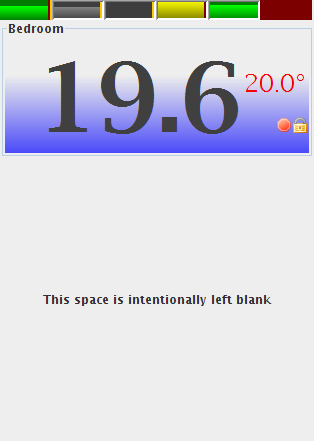
DIY Zoning Console

There's quite a few things that you see there.
  • There are six zones configured;
  • You're looking at the leftmost;
  • The name of this zone is "Bedroom"
  • Current temperature is 19.6°C - it'll be too cold if it was in Fahrenheit;
  • Setpoint is 20°C;
  • This zone is configured in heating mode - setpoint font is red;
  • Schedule will not affect this zone's setpoint - this is what the lock icon is indicating, also the orange vertical stripe on this zone's bar on top;
  • This zone is not voting (more about it below) - this is what the stop icon is indicating, also the dark red vertical stripe on this zone's bar on the top;
  • Second and third zones from the left are also on hold (orange vertical stripe);
  • Second and third zones from the left are not only on hold, but are also off (bar icons are not green but gray);
  • Fourth from the left zone is not voting, just like the first;
  • Fourth from the left zone is outside of tolerance, a.k.a. "calling" (the bar is yellow, not green);
  • Rightmost zone's sensor is faulty (the bar on top is dark red).
Background will also change depending on current operating mode, whether the HVAC unit is working, and where exactly the current zone is within the tolerance limits, but one picture is worth a thousand words - you'll see what I'm talking about when you watch it work.

Fair warning: the background behavior will change in future releases, don't get used to it too much.

How To Control It

The only way to control the application at this time is with keyboard shortcuts:
  • Left/Right arrows change the currently selected zone;
  • Up/Down arrows change the setpoint for the currently selected zone;
  • H puts the zone on hold or takes it off it;
  • V toggles voting status;
  • O toggles the zone on and off;
  • C and F toggle display between Celsius and Fahrenheit for all zones.

What Is "Voting"?

Simplest explanation is this: you won't want to turn on the HVAC because the temperature in your walk-in closet is too high/low, but if the HVAC already working, it'll be nice to have the temperature in the closet decent enough before it stops. A good reason to have a non-voting zone in the first place is that it is by implication a dump zone.

Look At The Bars Again

DIY Zoning Console
Upon close consideration, you might notice that each zone bar has a level indicator. It shows where within te tolerance limit each zone is, so you will have a good understanding how your whole house feels just by looking at this contraption.

One of reasons this is done this way is an observation on how people behave given dull thermostat reaction to slowly changing conditions (this haunts everyone in mid-season): sometimes it takes hours for your thermostat to realize that the temperature's been a hairdrop from triggering the HVAC all along. And what unhappy people do is start pressing buttons hoping to coax their thermostat to make something happen - even if it was already about to do that anyway. And of course, then they complain that now it's too cold or hot, and have to "fix" thermostat settings again.

With this display being there, they will hopefully see what the system is about to do and, knowing that, will have less inclination to fiddle with it, upsetting the balance.

Credits

Silk icon set by Mark James was used in this release.

Monday, December 7, 2009

DZ 3.2.2 "Humidor" Release Is Out

IMPROVEMENTS

Added ability to use a humidity sensor based on com.dalsemi.onewire.container.HumidityContainer to operate a humidifier and/or dehumidifier.

This is a snippet of configuration that makes it work:
<bean id="device_factory"
class="net.sf.dz3.device.sensor.impl.onewire.OwapiDeviceFactory"
init-method="start">
<constructor-arg index="0" value="/dev/ttyUSB0" />
<constructor-arg index="1" value="regular" />
</bean>

<bean id="humidity_sensor-6500000055FF1A26"
factory-bean="device_factory"
factory-method="getHumiditySensor">
<constructor-arg value="6500000055FF1A26" />
</bean>
The humidity_sensor-6500000055FF1A26 bean is further used to feed te thermostat bean that is, however, not controlling the heating or cooling device, but a humidifier or dehumidifier instead - the control chain is identical.

UPDATE: It was reported that there is at least one humidity sensor reported as a temperature sensor - the HT3-R1-A board. In this case, you don't even need to change the factory-method attribute.

Wednesday, December 2, 2009

DZ 3.2.1 Maintenance Release

BUGFIXES

  • Race condition was preventing normal initialization of Parallax and possibly other serial servo controllers;
  • NaN damper position was being generated in BalancingDamperController, passed down to dampers and accepted by them under some circumstances.

IMPROVEMENTS

  • OwapiDeviceFactory now reports devices present on 1-Wire bus via JMX;
  • Damper controllers now support JMX insrumentation.

Tuesday, November 24, 2009

DZ 3.2 "Barebones" Release Is Out

CHANGES since 3.1-PASSIVE

Most important change: you can control your HVAC equipment again.
  • Fixed JMX control - only monitoring was possible before, complete control is possible now for attributes exposed;
  • Improved JMX representation - composite objects are now rendered correctly;
  • Ported HVAC equipment control logic from DZ1 code base.

CONFIGURATION

Blog format doesn't play well with XML excerpts, and as configuration is becoming more and more complex, it becomes more and more difficult to post it here. I'm currently writing the DZ3 configuration guide, and when it is ready, it'll be posted at DIY Zoning Project site, and this post will be updated to reflect the actual page.

Having said that, let me emphasize that this is an experimental release with many known bugts and even more unknown. Hence,

BIG RED WARNING

Just like it says here: YOU MUST UNDERSTAND THE CONSEQUENCES AND TAKE RESPONSIBILITY. THIS IS YOUR EQUIPMENT. IF YOU DO IT, YOU'RE ON YOUR OWN. IF IT BREAKS, YOU KEEP BOTH PIECES.

NEXT RELEASE

There are several possible directions where development efforts may be directed, and your voice counts. Please take a look at the poll on your right, and choose the option that suits you best. For now, here's an extended description of these directions.

Interface

Right now, this project is in a geek-only mode - Spring configuration is needed to boot it, JMX is the only way to control it. A GUI is much needed, with three distinctly different versions possible:
  • GUI-Swing
  • GUI-Web
  • GUI-Android
GUI-iPhone was also requested, but I neither have the iPhone itself, nor tany inclination whatsoever to do anything about it. If you do, welcome to the club, let's talk.

Configurator

Some day, it would be possible to have a visual, drag and drop PnP configurator for DZ. However, given the ratio of time it takes to learn how to configure it with Spring XML file (when the tutorials are done, that is) to the time it will stay up, chances of a Configurator materializing are slim. Nevertheless, the option is still available.

Distributed Operation

If you have several computers or other devices that can report their thermal state over TCP/IP, this option would be tempting. This is also very useful for integrating DZ with other home automation projects (MisterHouse comes immediately to mind).

Housekeeping

Like I said, Barebones is an experimental release. Of course, obvious bugs and/or improvements are already logged and being worked on, but again, priority matters, so this option is up. By the way, bug tracker is available, though right now it's still littered with DZ1 artifacts.

Something else?

Did I forget anything? Let me know.

Wednesday, November 11, 2009

DZ3 Instrumentation Release: What's In, What's Not

Any large working system has inevitably evolved from a small working system.

-- Source lost in time

WHAT'S IN
  • 1-Wire Sensors. Temperature and humidity for now;
  • Shell Sensor. If you can extract information from your hardware via shell script, this is what you use to make it available to DZ;
  • Thermostat;
  • Zone Controller;
  • HVAC Unit abstraction;
  • Damper Controller for bang-bang dampers;
  • Damper Controller for modulating dampers;
  • Complete data logging for every measurement point in between, including hysteresis and PID controllers inside of thermostat;
  • JMX instrumentation (quite comprehensive) and control (limited for now).
WHAT'S NOT

Unfortunately, some essential stuff -
  • Servo controller integration;
  • HVAC Unit driver;
  • GUI;
  • Scheduler
And some not so essential -
  • DAC & Core talking over TCP;
  • Obviously, sensor discovery over LAN;
  • xAP, xPL loggers (try, they most probably work, but I haven't checked).
Reason for this is that I wanted to clean up issues accumulated over years, and make sure that the system is completely transparent, can be monitored, and bugs can be seen visually (and most of them are). So the net result of this effort, so far, is a working stable system with no actual outputs (other than data loggers). You can watch it, but you can't touch it.

SO HOW IS IT USEFUL?

Well, if you've never had DZ installed because it was too complex to install and configure, the day of Instrumentation Release is your lucky day. What is already done is a turnkey acceptance of all the sensor network with no configuration beyond 1-Wire adapter port name necessary. Hang the sensors on the wall, start DZ3 and watch your house's thermal behavior in gory details.

If you do already have some variant of DZ installed and connected to actuators, then hold off for a short while, the good stuff is coming.

WHAT'S NEXT?

Exactly what is missing from this release:
  • Servo controller integration;
  • HVAC Unit driver;
  • JMX instrumentation allowing to actually control the thermostat setpoints.
GUI and scheduler ports are still on a back burner for now, the priority is a stable and working system, not a nice looking system.

UPDATE: released.